


Threads Case Study: How we grew the audience from 30K to 250K views per month for "Active Parks"

In this case study, we break down 5 approaches that helped increase views for our client by 6x.
When working with Threads, it quickly became clear that the standard formats used on Facebook and Instagram wouldn't work. Statistics were volatile, rising and falling without stability. So, we began testing new hypotheses.
Here is how businesses can grow on Threads.
Client and Growth Dynamics
Client: Mass Sports Agency
Project: "Active Parks"
Audience: Young Ukrainians interested in sports and health
About the project:
A community that brings people of all ages together through mass sports and active leisure via large-scale free events and competitions.
Why Threads:
It is a hub for active people—perfect for discussing health topics, debunking myths, and building a conscious community through lively dialogue.
Before changing our strategy, the Threads page averaged 30,000 views per month; after, it reached 250,000 per month. Let’s break down the specific tips and approaches we used to achieve these results.
Tip 1. Don't sell or promote—start conversations on Threads
Posts where the author replies to comments get 40%+ more engagement —the highest impact of any social network. We tested this ourselves, and in August, our interactions grew by 8 times (678 → 5,500).
a. Comment on other people's posts
The main thing to understand is that a comment on Threads gets its own views and likes— and all of them count toward your account's statistics.
.png)
b. Reply to every comment on your post—immediately.
When you reply, the conversation continues, and the algorithm reads it as "people are actively talking here, let's show this post to more people." The post stays relevant longer and gains more reach.
.png)
c. Break long stories into a thread of 3–5 posts.
Don't cram everything into one massive post. Each part is a separate touchpoint: if someone hooks onto the first one, they keep going. Instead of one chance to grab attention, you get several.
Our experience. Our best thread in August reached 26.7k views—12 times more than the previous month. And it wasn't just a single post, but a story broken down into a thread.
And now, the main point—what this achieved in a month:
- Engagement: ×8 (678 → 5,500)
- Views: ×7 (27k → 200k)
- Audience: ×8 (19k → 157k)
And in September, the view count grew to 250k.
On Threads, it’s not the person with the most followers who grows, but the one who starts a conversation. A comment and a touchpoint are just as important here as your own post.
Tip 2. Don't wait for an audience; go into other people's feeds and comment.
Where do you start if nobody knows your account? Commenting.
For "Active Parks," commenting on other people's posts in the recommendation feed became the primary tool at the start. So, most of the initial growth came not from our own threads, but from our presence in others'.
.png)
How we did it: not just "Great post!", but adding our own context, a joke, or an opinion. A comment should be content in its own right.
- The main thing: at the start, it's not about the audience, it's about showing up in the feed.
Tip 3. Don't guess the format; test until you find what works for you.
There is no universal formula—every account is different. At first, we tested what others were doing: jokes, memes, and relatable life situations. But that didn't work for "Active Parks."
"Active Parks" is about mass sports and physical activity. So, we started talking about things that were organic to our niche:
- complex health issues;
- beauty and fitness trends;
- sports scandals;
- breakdowns of trending topics.
This type of content delivered significantly better results.
.png)
Tip 4. Don't rely solely on text; use hooks, topics, and SEO.
Once our basic strategy was working, we started testing additional mechanics to grab attention.
The first line in ALL CAPS. The beginning of your post needs to stop the scroll.
.png)
Topics and communities. Threads allows you to tag your post with a topic—this is an extra entry point. If you're writing about running, use the running thread; for books, use book threads; for a trend or a person, use the relevant topic. But don't just do it to check a box: the topic must match the content of the post.
SEO works on Threads, too. The platform analyzes your text, so using relevant names and keywords helps bring in an audience.
.png)
Example: in a post about the harmful "thinspiration" trend, we mentioned Jenna Ortega — people were searching for her and stumbled upon our post. So, if a topic is trending, include the keywords in your text.
Tip 5. Don't fly blind; track your views and engagement
The main metrics on Threads are views and engagement. If they’re growing, you’re on the right track.
However, there is an issue with analytics. Threads only provides data for 7, 14, 30, or 90-day periods—you can't select a custom date range, and the statistics aren't integrated with Meta Business Suite. Third-party tools don't offer full exports, so for longer periods, you're left with paid services or manual tracking. The desktop version is more convenient here—it's easier to work with charts and detailed data.
We, for our part, collect data in our own spreadsheet: we analyze our top-performing posts, see where the traffic came from, and what people reacted to in the comments. That’s how we decide what to post next.
Results of the new strategy
Below, we show the monthly performance dynamics on the platform
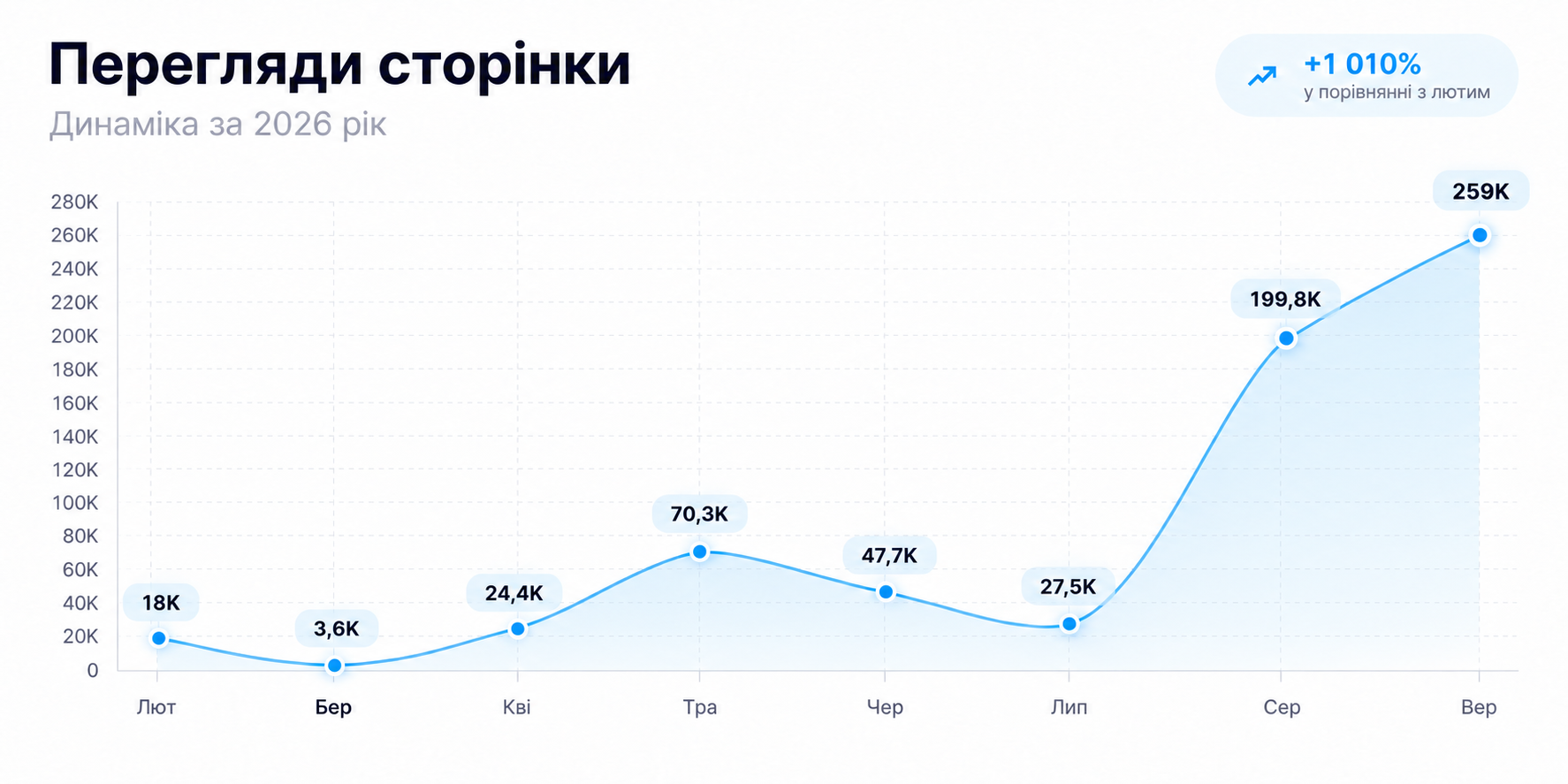
As a result, we had 200k views in August and 259k in September. Below, we show how the page's performance changed over three months.
.png)



.svg)